
Add a missing voucher
Post an entry that is on the bank statement but missing from your books, directly from the Bank Reconciliation page, as a general voucher or a contra voucher, with or without a bank date.
Before you start
What this does
Add Voucher posts an entry without leaving the reconciliation page. Use it when the statement shows something your books never recorded, for example bank charges, bank interest or a transfer from another account. With a Bank Date, the entry is created already reconciled on this bank book, so you do not need to tick it afterwards.
Where to find it
Go to Transactions > Bank Reconciliation, choose the bank book and press Add Voucher.
Steps
Set the Bank Date
It starts as the Statement Date of the page. Set it to the date the bank shows. The line beside it reads Created as reconciled on … cleared on this date.
Choose General Voucher or Contra Voucher
Use General Voucher for money in or out against an account head. Use Contra Voucher to move money between two of your own cash or bank books.
Fill the voucher
The fields are the same as on the Vouchers page. For a general voucher, Cash/Bank Book is already your bank book. The next section lists the fields.
Press Save and Close
The voucher is created and the lists on the page refresh. Save and New also closes the window in this screen, so press Add Voucher again for the next entry.
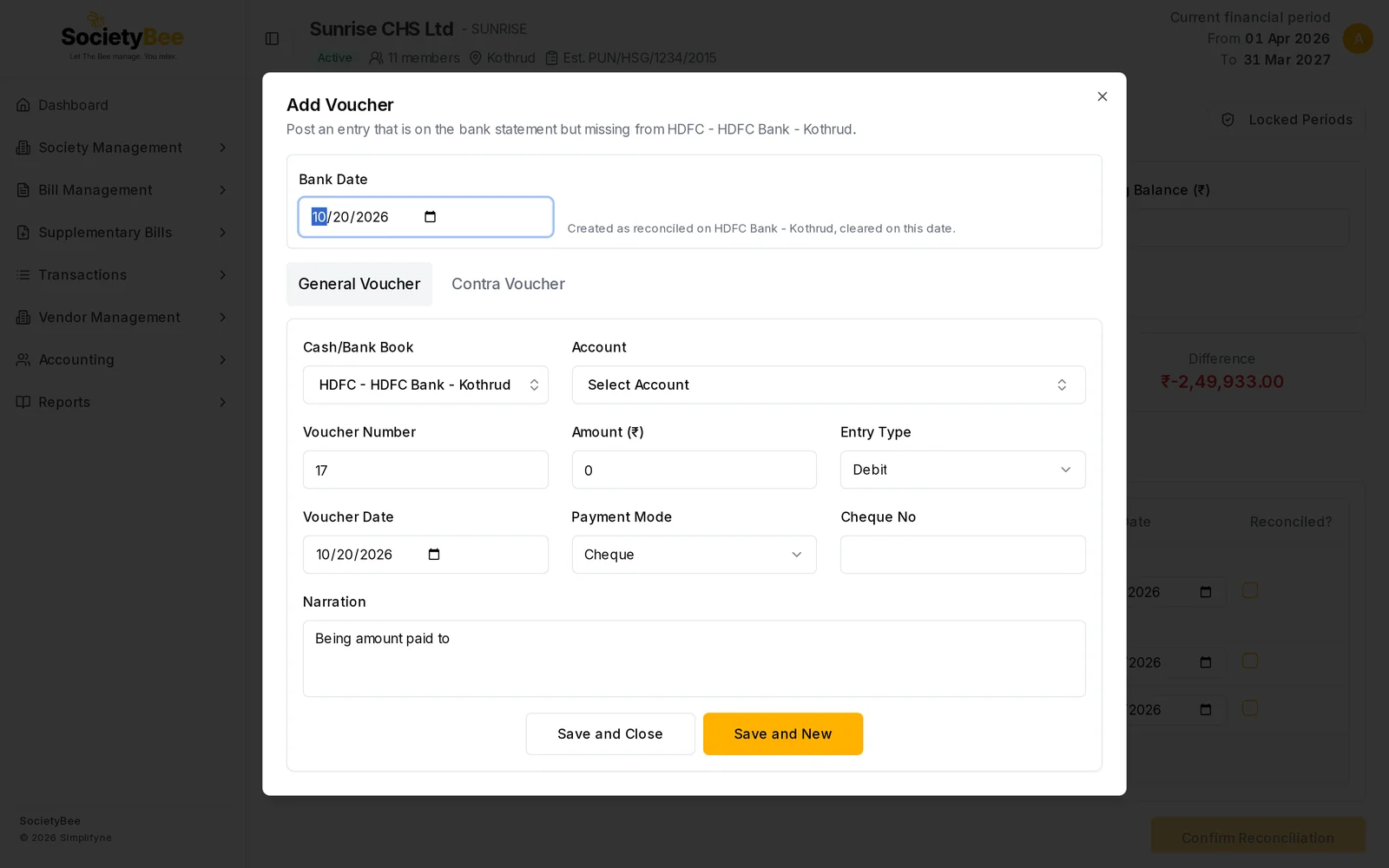
General Voucher fields
| Field | What it means |
|---|---|
| Cash/Bank Book | Fixed to the bank book you are reconciling |
| Account | The account head, for example Bank Charges |
| Voucher Number | The next number in your series. Filled in for you. |
| Amount (₹) | The amount shown on the statement |
| Entry Type | Debit for money out, Credit for money in |
| Voucher Date | The date of the entry. It starts as today, so set it to the statement date. |
| Payment Mode | Cheque, Cash, UPI and so on |
| Cheque No | The cheque or reference number |
| Narration | A description for the day book |
For the full rules of each field, see Create a general voucher.
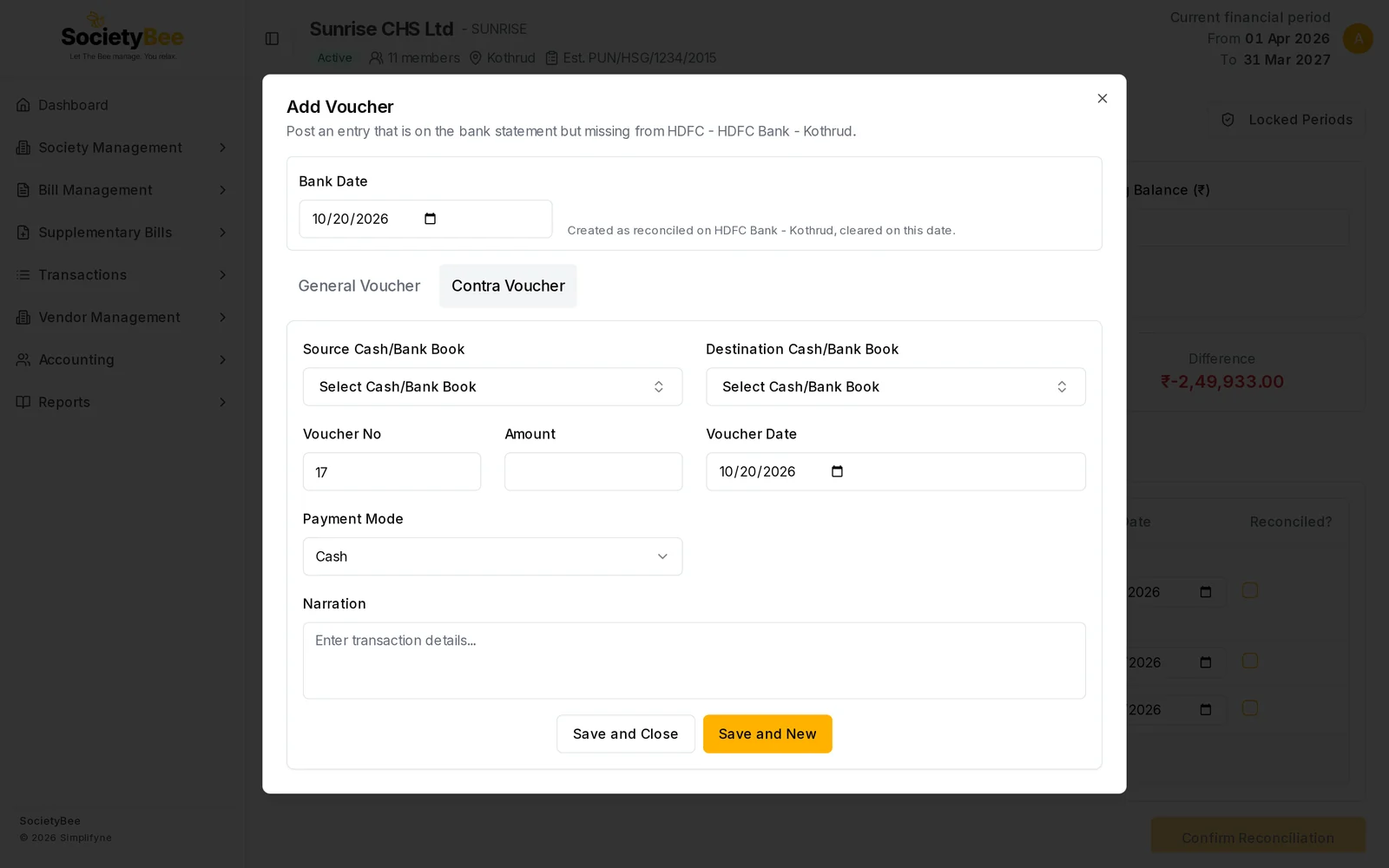
Contra Voucher fields
| Field | What it means |
|---|---|
| Source Cash/Bank Book | The book the money leaves |
| Destination Cash/Bank Book | The book the money goes to |
| Voucher No, Amount, Voucher Date, Payment Mode, Narration | As on the general voucher |
The source and the destination must be different books. For the rules, see Contra voucher.
The Bank Date box
| Bank Date | What happens |
|---|---|
| A date | The entry is created as reconciled on this bank book, with that bank date |
| Empty | The entry is posted normally, without a bank date. It appears under In Books, Not in Bank Statement until you reconcile it. |
What you cannot add here
Journal vouchers are not offered. A journal posts to the journal book, never to a bank book, so it cannot be reconciled. Use the Vouchers page for journals. See Journal voucher.
Common mistakes and questions
The entry appears in the work list, not as reconciled. The Bank Date was empty. Tick it in the list and give it a bank date. See Reconcile by ticking entries.
I get the message that the period is frozen. The Voucher Date or the Bank Date falls inside a locked range. See Freeze a period.
Should I use this or the statement review? When you have uploaded a statement, create the entry from the line itself, so the line and the entry are linked. See Review the matches. Use Add Voucher for manual reconciliation, or for a transfer between your own accounts.
What happens next
The entry shows under Reconciled Transactions if you gave it a bank date. The Difference at the top moves towards ₹0.00.