
Member ledgers
See every member's bills, receipts and adjustments with a running balance, filter members by dues or advance, expand one member's history, and download it as Excel.
Before you start
What this does
The Members tab of the account ledger shows one ledger for every member. A member's ledger lists each bill, interest charge, receipt and adjustment in date order with a running balance. Use it to answer a member's how much do I owe, and why?
Where to find it
Go to Reports > Account Ledger and open the Members tab. You can also open one member's ledger from the Defaulters report with the book icon.
Read the page
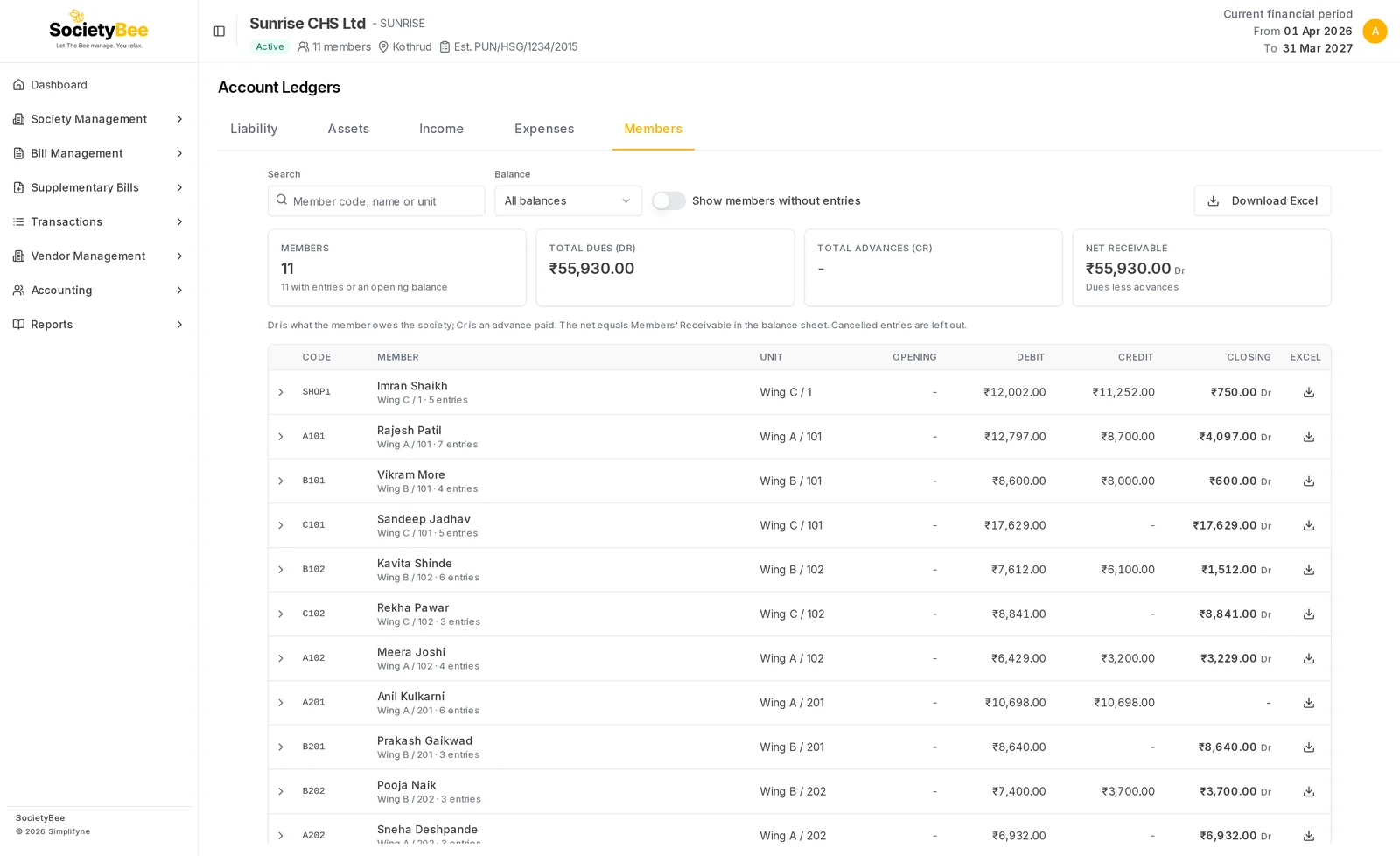
The cards
| Card | Meaning |
|---|---|
| Members | How many members the society has, and how many have entries or an opening balance |
| Total dues (Dr) | What members owe the society |
| Total advances (Cr) | What members have paid in advance |
| Net receivable | Dues less advances. It equals Members' Receivable in the balance sheet. |
The cards always describe all members, not only the ones your search shows.
The list
For each member: Code, Member, Unit, Opening, Debit (billed), Credit (paid) and Closing, with Dr when the member owes and Cr for an advance. Under the name you see the flat and the number of entries.
Find a member
Search
Type a member code, name or unit, for example A101 or Wing B.
Choose a Balance
All balances, Owes (Dr), Advance (Cr) or Settled (nil).
Show members without entries (optional)
A member with no entry and no opening balance is hidden to begin with. Switch this on to list them too.
See one member's history
Press the member's row. The ledger loads and opens under the row.
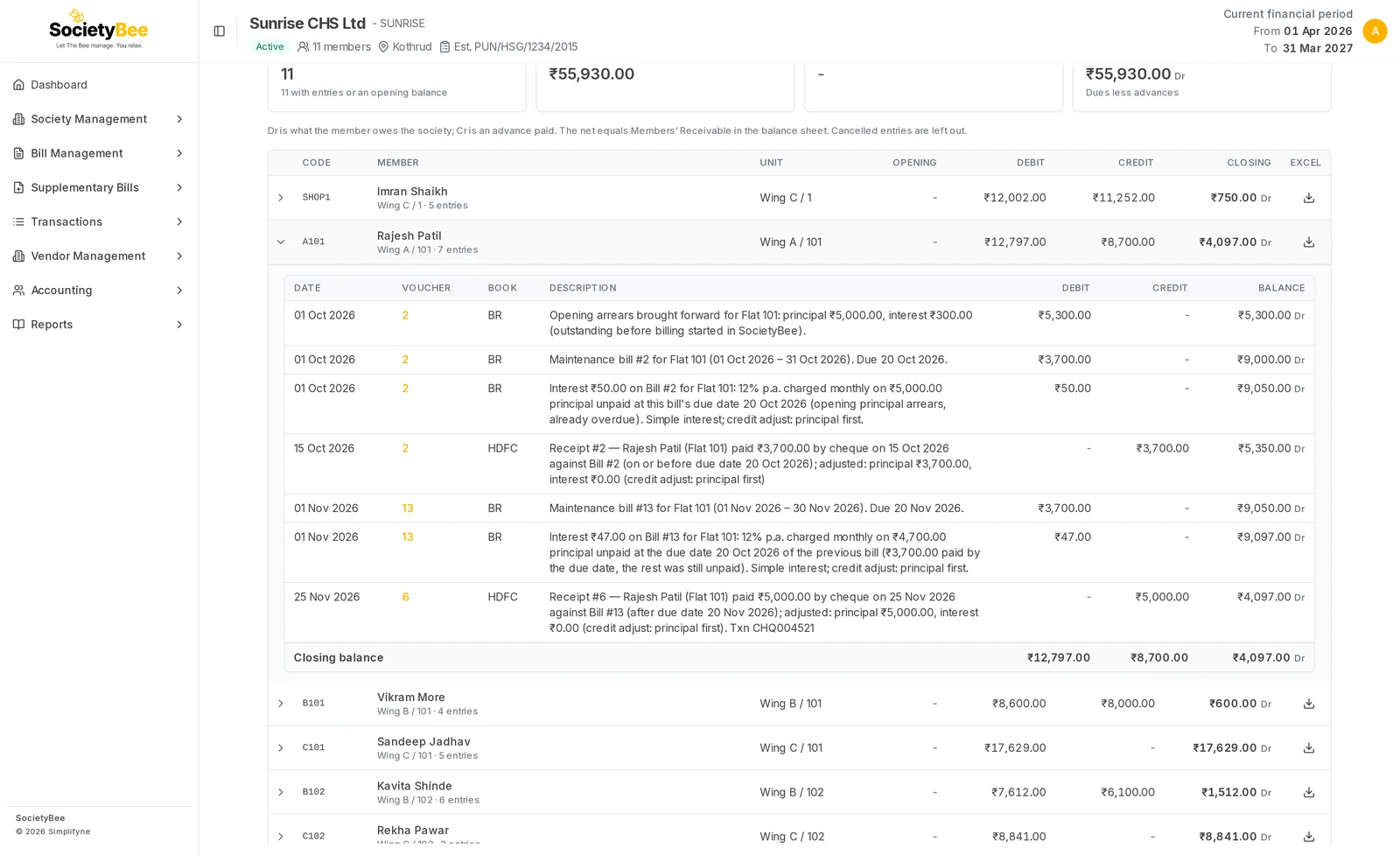
| Column | Meaning |
|---|---|
| Date | The date of the entry |
| Voucher | The bill or receipt number. Press it to open the bill or receipt for correction. |
| Book | The book the entry was made in, for example BR for bills or HDFC for a cheque receipt |
| Description | What the entry is. Receipts say how the payment was adjusted, and interest says how it was worked out. |
| Debit | Amount charged to the member |
| Credit | Amount paid or credited |
| Balance | The member's balance after the entry |
The last row shows the Closing balance.
Download
- Download Excel at the top downloads the list of members as shown, with your search and balance filter.
- The download icon on a row downloads that member's ledger as Excel, which you can share as a statement of account.
- Inside an open ledger, Excel does the same.
Fields and buttons
| Control | What it does |
|---|---|
| Search | Member code, name or unit |
| Balance | All, owes, advance or settled |
| Show members without entries | Includes members with nothing posted |
| Member row | Opens or closes that member's ledger |
| Download Excel | Downloads the list, or one member |
| Voucher number | Opens the bill or receipt |
Common mistakes and questions
A member's balance looks wrong. Read the descriptions. Opening arrears come first, then each bill and its interest, then receipts. If a bill is wrong, use Bill correction. If a receipt is wrong, see Cancel or correct a receipt.
The net receivable differs from the balance sheet. Some old entries may not be booked to the Members' Receivable account. The Reconciliation tab of the Defaulters report shows the gap.
What happens next
Send a reminder from the Defaulters report, or record a payment as a receipt.