
Add a member
Fill in the Add New Member form step by step, with the flat details, contact details and any old balance, and see what each field means.
Before you start
What this page does
Add New Member creates one member with their personal details, their premise (flat, shop and so on) and any amount they already owe. When you press Create & Continue, the member is saved and SocietyBee opens the next tab, where you set the bill amounts.
Where to find it
Go to Society Management > Members and press Add New Member. The form is the first of three tabs: Basic Info, Bill Headings and Supplementary Bill Headings.
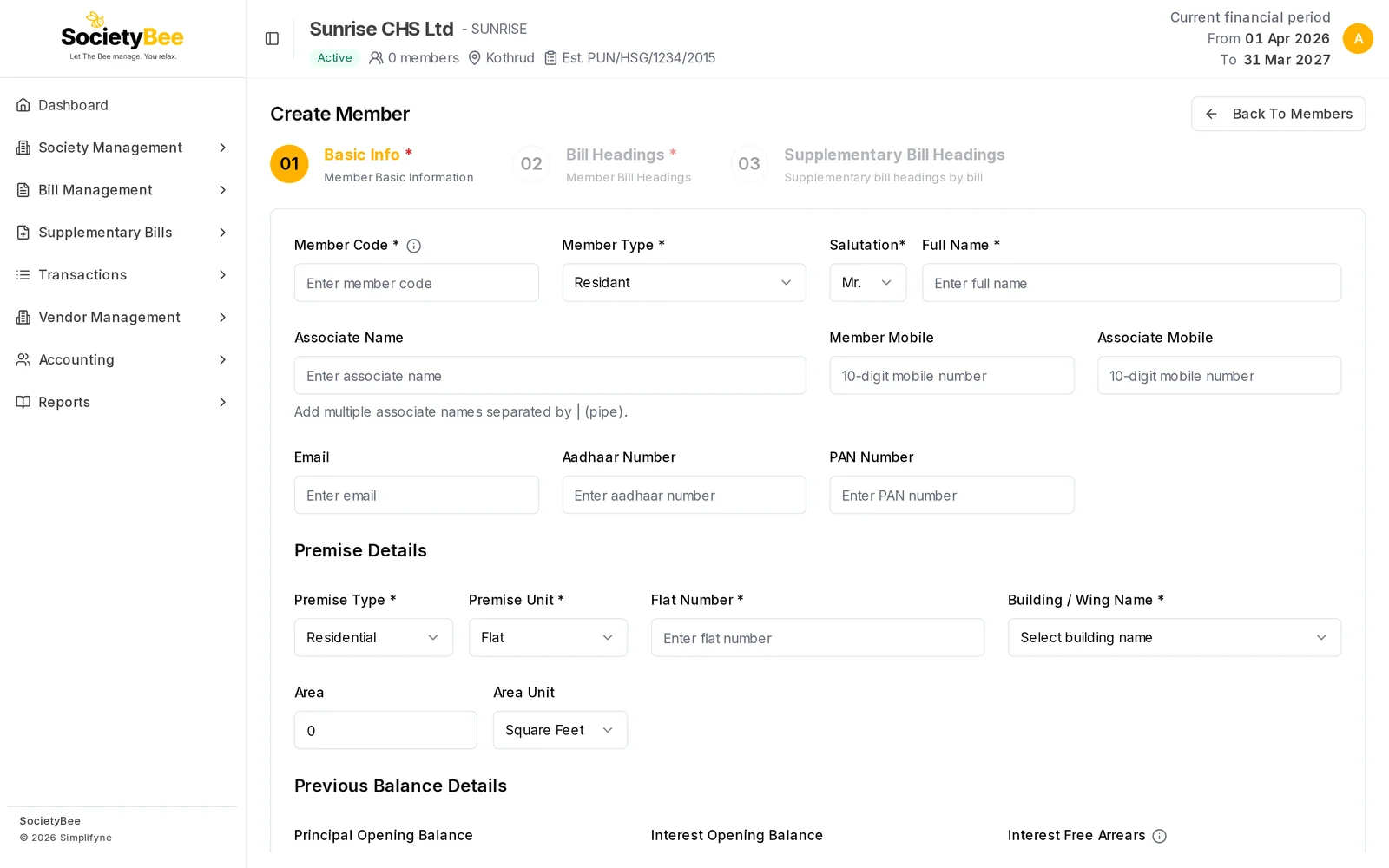
Fill in the form
Enter a unique Member Code
A code that identifies this member inside your society, for example
A101. It must be unique. If it is already used, the form says Member code already exists. The code cannot be changed after you save.Choose the Member Type, Salutation and Full Name
Member Type is Residant, Chairman, Committee Member, Manager, Secretary or Treasurer. Choose Salutation from Mr., Mrs., Ms. or Dr. and type the Full Name, which is the name printed on the bill.
Add an Associate Name (optional)
Use this for a co-owner, such as a spouse. To add several names, separate them with a pipe symbol, for example
Sunita Patil | Rohan Patil.Add contact details
Enter the Member Mobile and, if you want, the Associate Mobile, each exactly 10 digits. If you paste a number that starts with +91 or 0, SocietyBee removes the prefix for you. Add the Email too, because bills can be sent there. Aadhaar Number and PAN Number are optional.
Choose the Premise Type and Premise Unit
Residential offers Flat and Room. Commercial offers Shop, Office, Warehouse and Gala. The next field's name follows your choice, for example Flat Number or Shop Number.
Enter the number and choose the Building / Wing Name
Type the Flat Number (or Shop Number and so on). Then pick the Building / Wing Name from the list. The list contains the buildings you entered in Basic Details.
Enter the Area (optional)
Type the Area and choose the Area Unit: Square Feet or Square Meters.
Enter any old balance
Fill Previous Balance Details only if this member owes money from before. See Member opening balance and arrears. Leave it at
0if not.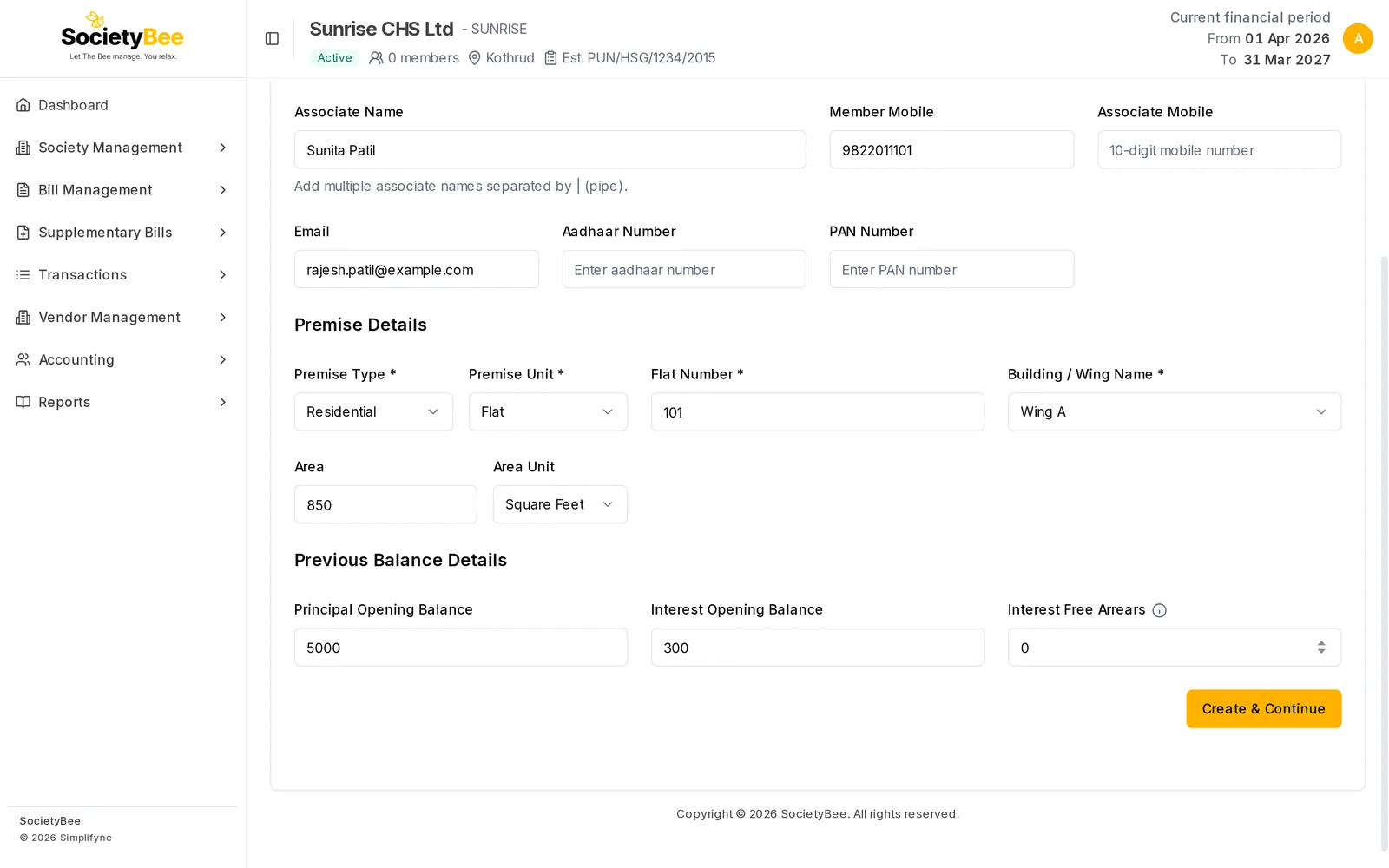
The lower half: premise details and previous balance. Press Create & Continue to save. Press Create & Continue
The member is saved and the Bill Headings tab opens so you can check what this member will pay.
Fields and buttons
| Field | What it means | Example | Required |
|---|---|---|---|
| Member Code | Unique code in your society. Cannot be changed later. | A101 | Yes |
| Member Type | Residant, Chairman, Committee Member, Manager, Secretary or Treasurer | Residant | Yes |
| Salutation | Mr., Mrs., Ms. or Dr. | Mr. | Yes |
| Full Name | Name printed on the bill | Rajesh Patil | Yes |
| Associate Name | Co-owner. Separate several with |. | Sunita Patil | No |
| Member Mobile | 10-digit number | 9822011101 | No |
| Associate Mobile | 10-digit number | No | |
| Where bills can be emailed | rajesh.patil@example.com | No | |
| Aadhaar Number, PAN Number | Identity details | No | |
| Premise Type | Residential or Commercial | Residential | Yes |
| Premise Unit | Flat or Room (residential). Shop, Office, Warehouse or Gala (commercial). | Flat | Yes |
| Flat / Room / Shop Number | Number of the unit | 101 | Yes |
| Building / Wing Name | One of your society's buildings | Wing A | Yes |
| Area, Area Unit | Size of the unit | 850, Square Feet | No |
| Principal Opening Balance | Unpaid charges from before | 5000 | No |
| Interest Opening Balance | Unpaid interest from before | 300 | No |
| Interest Free Arrears | Old amount that earns no interest | 0 | No |
| Back To Members | Leave the form | ||
| Create & Continue | Save the member and open Bill Headings |
Common mistakes and questions
It says "Member code already exists". Another member already has that code. Use a different one, for example add the wing letter.
My wing is not in the Building / Wing list. Add it to Buildings / Wings Name in Basic Details, separated by commas, and save.
The mobile number is rejected. It must be 10 digits only. Remove spaces and dashes.
I made a mistake in the name or flat number. You can edit it later. See Edit or delete a member. Only the Member Code cannot be changed.
What happens next
Next, check the member's bill heading amounts.