SocietyBee
    Billing
    Automated maintenance & charge billing
    Collections
    Track payments, send reminders
    Accounting
    Double-entry ledger & bank reconciliation
    Reports & Compliance
    Bye-law compliant statutory reports
    BeeAgent AI
    Natural language queries on your data
    For CAs & Accountants
    Manage all societies from one login
    For Treasurers
    Simple billing & audit-ready records
    For Managing Committee
    Visibility without the spreadsheets
    Docs
    Step-by-step guides for every module
    Blog
    Society management guides & tips
    Glossary
    Accounting & society terms explained
    vs MyGate
    Accounting vs gate security app
    vs ApnaComplex
    Multi-society CA login vs per-society pricing
    vs SocietyRun
    BeeAgent AI & zero gateway commission
    vs NoBrokerHood
    Accounting vs marketplace app
    vs Excel
    Audit trail & statutory reports vs spreadsheets
    Pricing
    Sign inStart free →
    Society Onboarding
    Member Onboarding
    • Member onboarding overview
    • Add a member
    • Set bill heading amounts for a member
    • Set supplementary heading amounts
    • Upload members in bulk from Excel
    • Member opening balance and arrears
    • Edit or delete a member
    • The member list and search
    Bills
    Receipts
    Vouchers
    Vendors, TDS and GST
    Reports
    Supplementary Bills
    Bank Reconciliation
    Docs / Member Onboarding

    Member onboarding overview

    Learn the two ways to bring your members into SocietyBee, what each member record holds, and what happens to bill amounts when a member is created.

    Who can do this:adminemployee 3 min read Checked 18 Oct 2026

    Before you start

    • Set up bill headings

    What this page does

    A member is one flat, shop or other premise in your society and the person billed for it. Every bill, receipt and ledger entry is tied to a member. This guide shows the two ways to add them and where everything is.

    Where to find it

    Go to Society Management > Members. The page title shows how many members you have, for example Members (11). A new society shows Members (0).
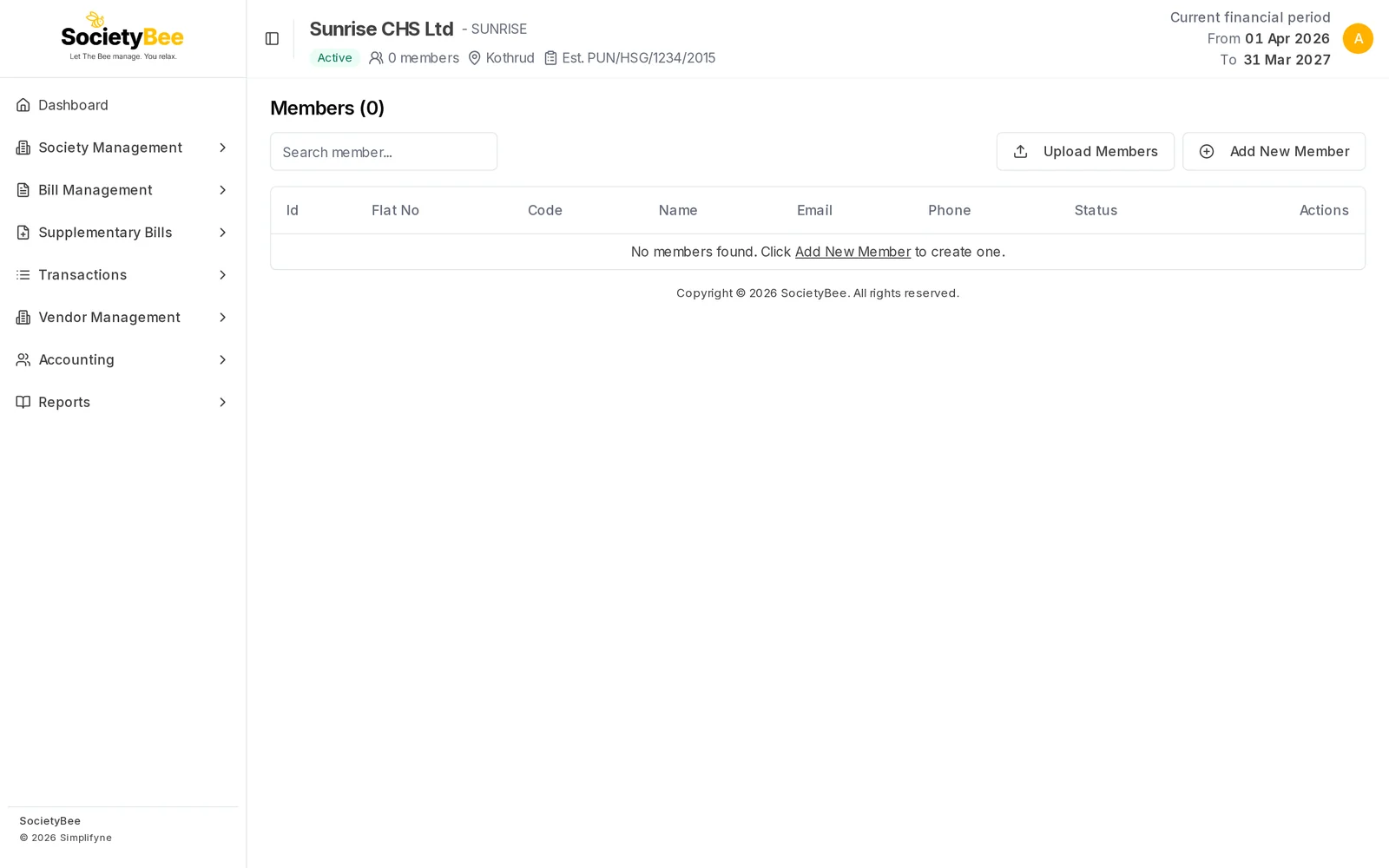
    Members (0) page with a search box, Upload Members and Add New Member buttons and the message No members found
    A new society has no members yet. You can also reach this page from the Add Members button on the dashboard.

    Two ways to add members

    Add one memberUpload many from Excel
    ButtonAdd New MemberUpload Members
    Best forSocieties with a few members, or one new member laterA society moving in all its flats at once
    Bill amountsCopied from the society's headings, then edit per memberFilled in the Excel sheet, one column per heading
    GuideAdd a memberUpload members in bulk

    Tip

    If you have more than about five members, use the Excel upload. Add the first member by hand if you want to see how the form works, then upload the rest.

    What each member record holds

    Adding a member in the form has three tabs, in this order:

    1. Basic Info: name, contact details, flat details and any old balance. See Add a member.
    2. Bill Headings: what this member pays for every charge. See Set bill heading amounts for a member.
    3. Supplementary Bill Headings: extra bills, such as a one-time repair levy. See Set supplementary heading amounts.

    When you create a member, SocietyBee copies every bill heading of your society into that member's record with the amount you set on the heading. A member whose amounts are different (for example a shop, or a flat with two parking slots) is changed afterwards.

    Before you start

    Have these ready for every member:

    • a unique member code (many societies use the flat number, such as A101)
    • salutation, full name, and mobile number
    • flat or unit number and wing or building
    • any amount the member still owes from before SocietyBee, as on your starting day (see Member opening balance and arrears)

    You must have finished Bill Headings first. Members get their charges from those headings.

    Common mistakes and questions

    Is a member the owner or the flat? Both. A member is the billing record for one premise. If a flat changes hands, update the name on the same member rather than adding a new one.

    Can two members have the same flat number? Yes, if they are in different wings. For example flat 101 can exist in Wing A, Wing B and Wing C.

    Can I add members later, after I start billing? Yes. A new member is billed from the next bill run you generate.

    What happens next

    Add your first member with Add a member, or go straight to Upload members in bulk.

    Related guides

    • Add a member
    • Upload members in bulk from Excel
    • The member list and search
    Next Add a member

    On this page

    1. What this page does
    2. Where to find it
    3. Two ways to add members
    4. What each member record holds
    5. Before you start
    6. Common mistakes and questions
    7. What happens next
    SocietyBee

    Built in Mumbai by Simplifyne Technologies Private Limited. Serving housing societies across India.

    Enquiries

    +91 95949 04493
    admin@societybee.in

    Product

    • Billing
    • Collections
    • Accounting
    • Reports & Compliance
    • BeeAgent AI
    • For CAs & Accountants
    • For Treasurers
    • For Managing Committee

    Resources

    • Docs
    • Blog
    • Glossary
    • SocietyBee vs MyGate
    • SocietyBee vs ApnaComplex
    • SocietyBee vs SocietyRun
    • SocietyBee vs NoBrokerHood
    • SocietyBee vs Excel

    Company

    • About
    • Trust & Security
    • Pricing
    • Early Access
    • Book a Demo
    • Contact
    • Privacy Policy
    • Terms & Conditions
    • Refund Policy

    🇮🇳 We serve housing societies across India

    Operating team based in Mumbai.

    © 2026 Simplifyne Technologies Private Limited.

    All rights reserved.