
Trial balance
Check that the society's debits equal its credits, read the assets, liabilities, income and expenses sections, understand the does not tally warning, and download the trial balance.
Before you start
What this does
The Trial Balance lists the balance of every account that has one, in a Debit column or a Credit column, for the society's current financial year. Because every entry in SocietyBee has two equal sides, the total debit must equal the total credit. If they do not, something is wrong in the books and the report tells you.
Where to find it
Go to Reports > Trial Balance. The line at the top says the period, for example Financial year 01 Apr 2026 to 31 Mar 2027 · as on 31 Mar 2027.
Read the report
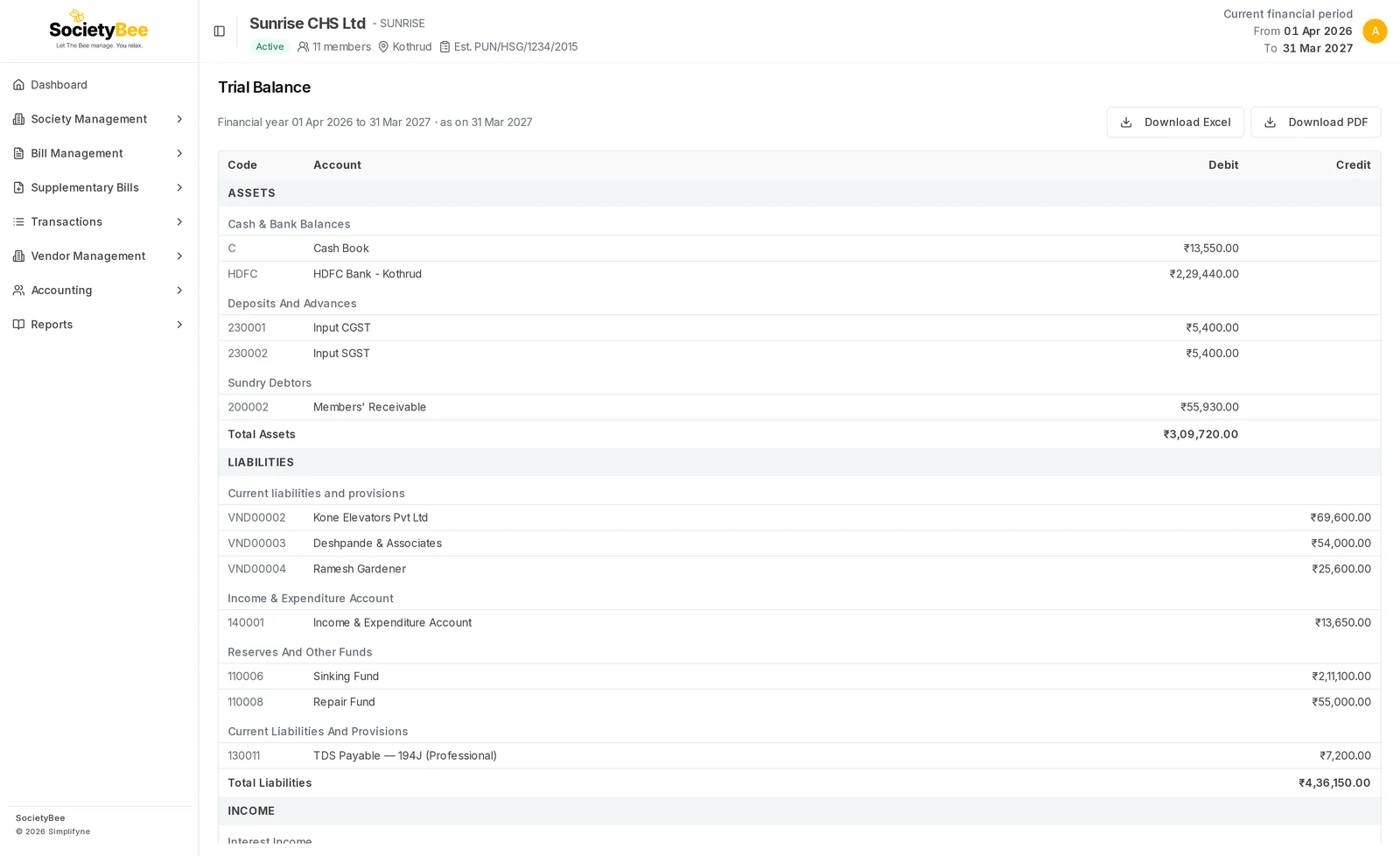
The report has four sections, in this order.
| Section | What it holds | Normal side |
|---|---|---|
| ASSETS | Cash and bank books, deposits, Input GST, Members' Receivable | Debit |
| LIABILITIES | Funds, vendors you owe, TDS and GST payable, accumulated surplus | Credit |
| INCOME | Interest, rent, member charges | Credit |
| EXPENSES | What the society spent | Debit |
Inside each section, accounts sit under their head group, for example Cash & Bank Balances. Every line has a Code, an Account name and an amount in Debit or Credit. Each section ends with a Total row. Accounts with a nil balance are left out.
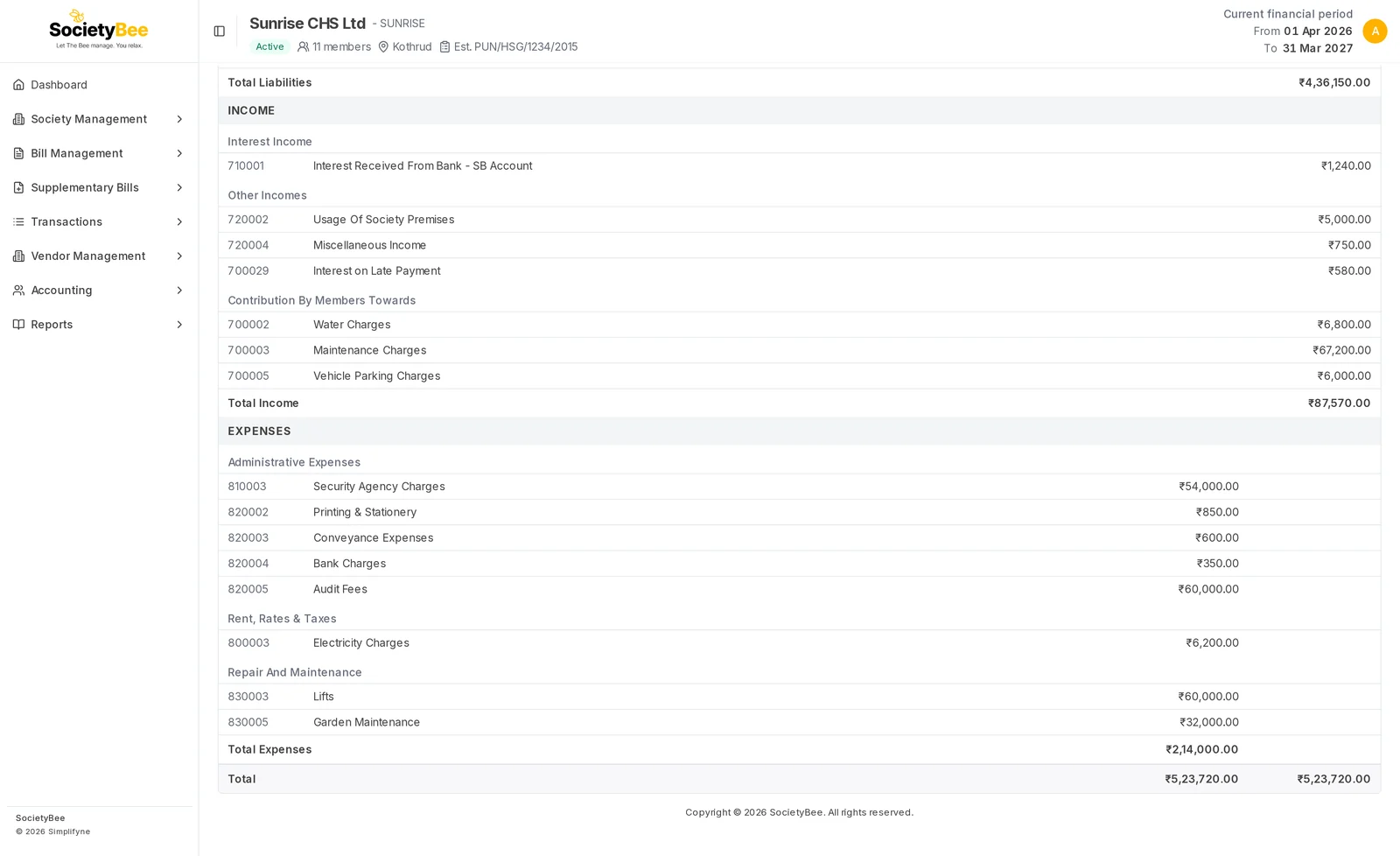
The last row, Total, shows the total debit and total credit. They match when the books are right.
When the trial balance does not tally
If the two totals differ, a red banner appears above the table:
Trial balance does not tally: debit exceeds credit by ₹…. Check opening balances in Account Master and unbalanced vouchers.
The amount is the difference. A negative amount means the credit side is higher.
Check opening balances
A missing opening balance is the most common cause. Bank and cash balances are set on the book, and funds and capital on the account. See Opening balances and Bank and cash books.
Look for the difference in the Members' Receivable account
Compare the Members' Receivable line with the total on the Defaulters reconciliation tab. A gap there points to member entries that are not booked to the account.
Search for a one-sided entry
Open the Account ledger and look for an entry in the amount of the difference with no matching entry on the other side.
Download
Download Excel and Download PDF save the report for the auditor. They appear when there is something to show.
Fields and buttons
| Part | Meaning |
|---|---|
| Code | The account code |
| Account | The account name |
| Debit | The balance, when it is a debit |
| Credit | The balance, when it is a credit |
| Total | The totals of a section and of the whole report |
| Download Excel, Download PDF | Save the report |
Common mistakes and questions
The page says the financial year is not configured. The society has no financial year dates. The year is chosen when the society is created. See Create a society.
The page says there are no balances. Nothing has been posted in this financial year yet.
A figure looks wrong, but the totals match. A trial balance can tally and still hold a wrong entry, for example an amount posted to the wrong account. Check the account in the Account ledger.
Can I choose another year or date? No. The trial balance is always for the society's current financial year.
What happens next
When the trial balance tallies, open the Balance sheet.