
Send notices to defaulters
Send a dues reminder by email and WhatsApp to one defaulter or to the whole filtered list, with the safety checks that skip recent and doubtful cases, and read the notice history.
Before you start
What this does
A defaulter notice tells a member what they owe as of today, by email, by WhatsApp, or both. You can send one to a single member, or to everyone in the list you are looking at. Every notice is recorded in a history for that member.
Where to find it
Go to Reports > Defaulters. The bell icon on a row sends a notice to that member. Notify defaulters at the top right sends to the whole list.
Before you start
- Set As on to today. A notice carries today's dues, so it cannot be sent for another date. If As on is not today, the buttons are switched off and a note says Set the As on date to today to send it.
- Members need an email id or a mobile number on their record. See Add a member.
- Messages reach members straight away and cannot be recalled.
Send a notice to one member
Press the bell on the member's row
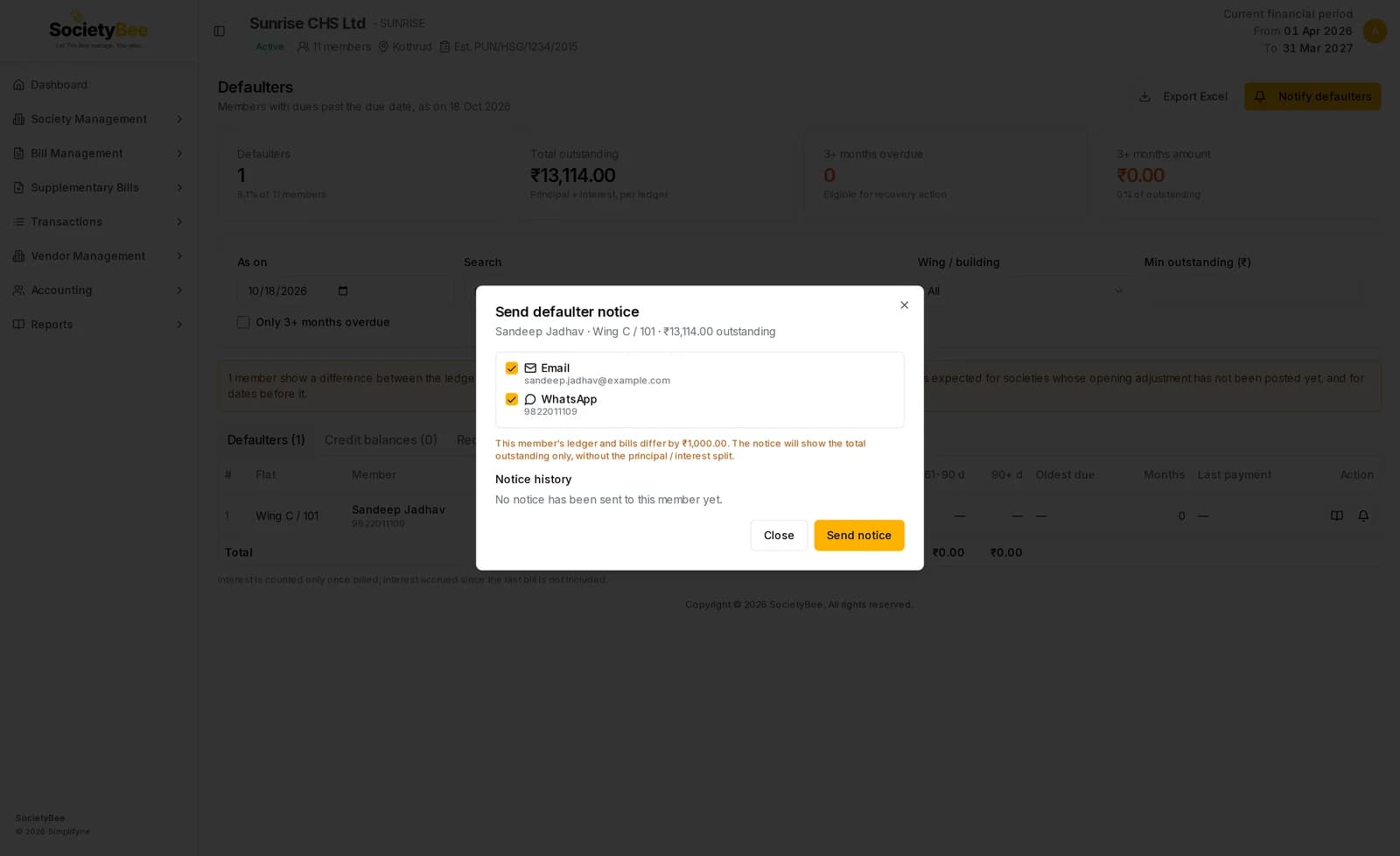
A window titled Send defaulter notice opens with the member, the flat and the amount outstanding.
Choose the channels
Email and WhatsApp are both ticked when the member has an address and a number. A channel without a contact reads No email id on record or No mobile number on record and is switched off.
Read the notes
If the member's ledger and bills differ, an amber note says the notice will show the total outstanding only, without the principal and interest split.
Press Send notice
A message Notice sent with the count appears. If a channel fails, the reason is shown, for example a WhatsApp number that is not reachable.
Notice history
Under the channels, Notice history lists every earlier notice to this member: date and time, Email or WhatsApp, Sent or Failed, the recipient, the amount and the as on date. A failed notice shows the reason. The newest is marked Latest. A new member reads No notice has been sent to this member yet.
Send notices to many members
Filter the list first
The bulk window uses the defaulters currently on screen. Clear the filters to notify everyone, or filter by wing or by Only 3+ months overdue to notify one group.
Press Notify defaulters
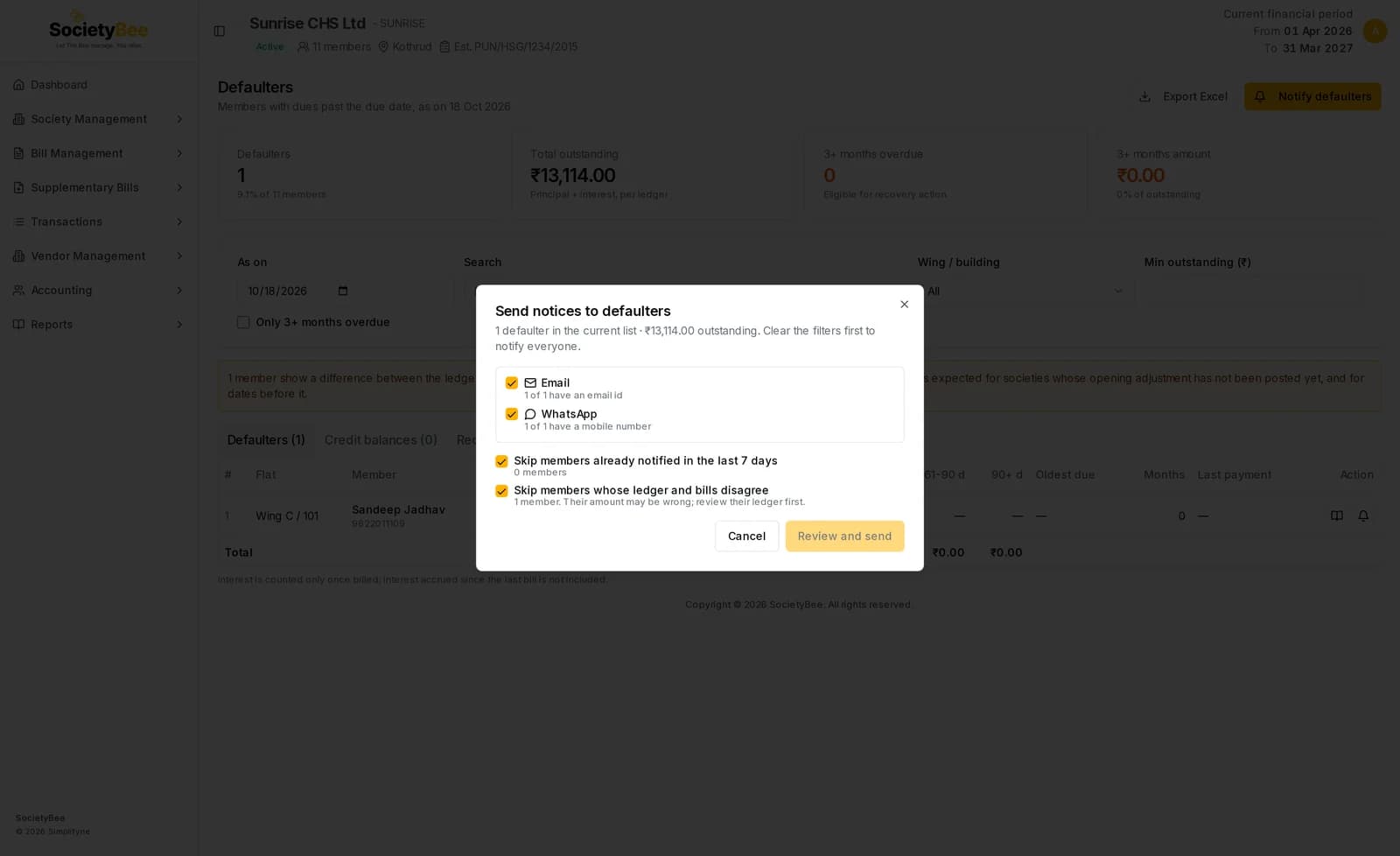
A window titled Send notices to defaulters shows how many defaulters are in the list and their total outstanding.
Choose the channels
Each channel shows how many members have an email id or a mobile number, for example 1 of 1 have a mobile number.
Choose the safety checks
Both are ticked to begin with. See the table below.
Press Review and send
A confirmation line says About to notify up to N members by email and WhatsApp. Check the number.
Press Confirm and send
The result shows sent and not delivered counts for each channel, a Left out line with the reasons, and a list of the members who did not receive it.
| Safety check | What it does |
|---|---|
| Skip members already notified in the last 7 days | Leaves out members who were sent a notice in the last seven days, so nobody is messaged twice. The count is shown. |
| Skip members whose ledger and bills disagree | Leaves out members whose amount may be wrong, so you can review their ledger first. |
Review and send is switched off when no channel is ticked, when As on is not today, or when the checks leave nobody to notify. The estimate on the confirmation line is final only after the server has checked the list again.
Large lists are sent in batches of 50.
Fields and buttons
| Control | What it does |
|---|---|
| Email, WhatsApp | Choose how the notice goes |
| Send notice | Sends to one member |
| Notify defaulters | Opens the bulk window for the list on screen |
| Review and send | Shows how many members will be notified |
| Confirm and send to N | Sends the notices |
| Cancel or Close | Leaves without sending, or closes the result |
Common mistakes and questions
The send buttons are disabled. Either As on is not today, no channel is ticked, or nobody is left after the checks. Set As on to today.
The notice shows only a total. The member's ledger and bills do not agree, so the split into principal and interest could be wrong. Open their ledger and correct it.
I sent a notice by mistake. It cannot be recalled. The history keeps a record of what was sent.
A WhatsApp notice failed. Read the reason shown in the result or in the member's notice history, and check the mobile number on the member's record.
What happens next
Follow up on members who were left out or failed. When a member pays, record the receipt and they leave the defaulters list.