
Opening balances and arrears
Enter what your society already holds and what members already owe on the day you start using SocietyBee, so your first reports and bills start from the right numbers.
Before you start
What this page does
If your society had accounts before SocietyBee, you must tell SocietyBee where things stood on your starting day. These are opening balances. They are entered in three places, because each kind of balance belongs to a different part of the books:
| What you are entering | Where | Guide |
|---|---|---|
| Cash in hand and money in each bank account | Cash / Bank Books, Opening Balance | Bank books and cash book |
| Funds and other balance-sheet items such as Sinking Fund, Repair Fund and share capital | Account Master, Opening Balance | This guide |
| What each member owes from before | The member's Previous Balance Details | Member opening balance and arrears |
Before you start
Get these figures from your last audited balance sheet or your accountant, as on the day before you start:
- cash in hand and the balance of each bank account
- each fund and liability, such as sinking fund and repair fund
- each member's unpaid maintenance and unpaid interest
Enter opening balances for funds and other accounts
Open Account Master
Go to Accounting > Account Master. Use Search by name or code to find the account, for example
Sinking Fund.Click the edit icon on the row
The Edit Account Ledger dialog opens with the code, name, head type and group.
Type the Opening Balance
Enter the balance brought forward, for example
200000for a sinking fund of ₹2,00,000.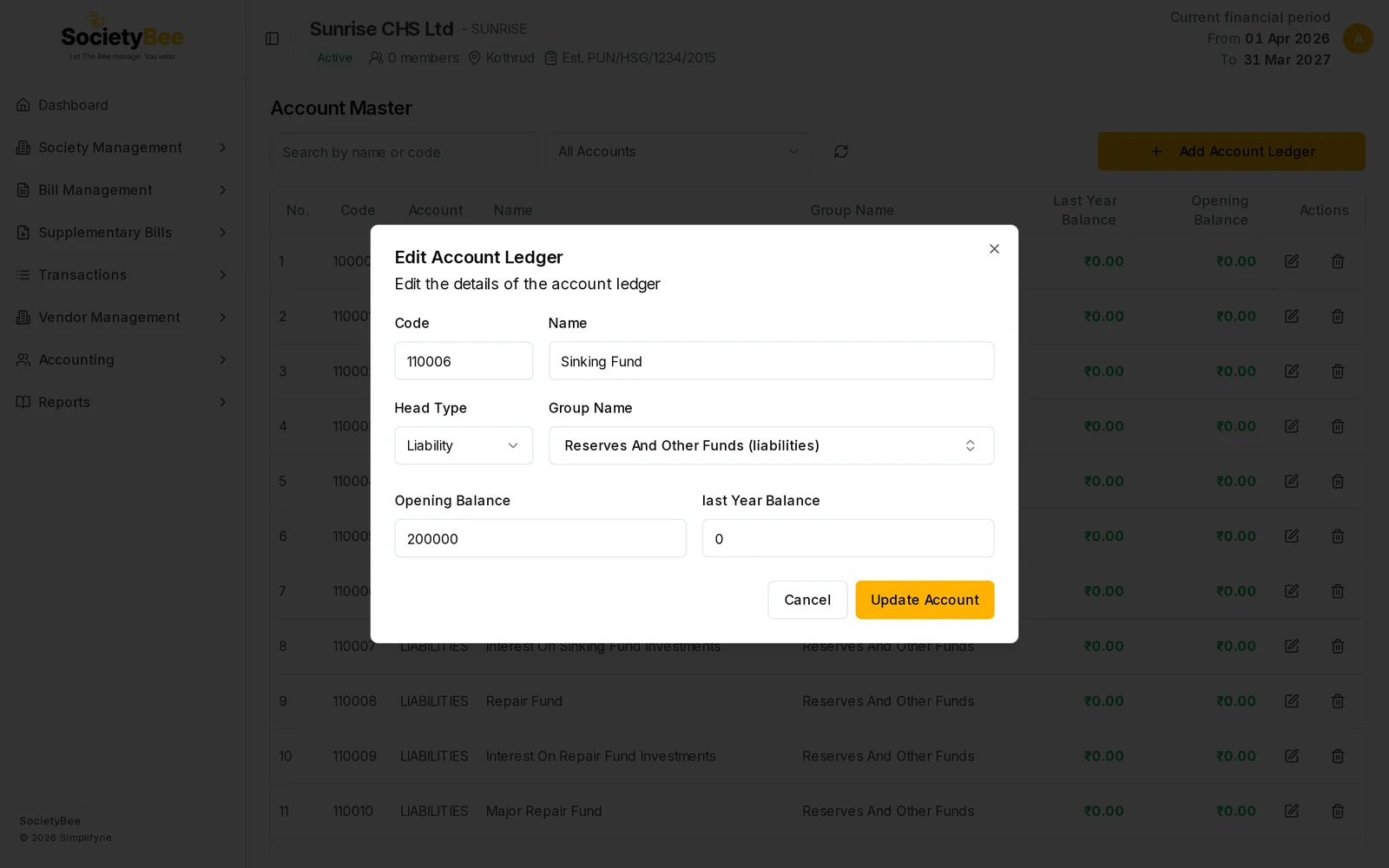
Sinking Fund with an opening balance of ₹2,00,000. Press Update Account
The new balance shows in the Opening Balance column of the list.
Which accounts take an opening balance
Only assets and liabilities carry a balance forward. SocietyBee shows the Opening Balance field only where it is right to enter one. Otherwise the dialog shows a note in its place.
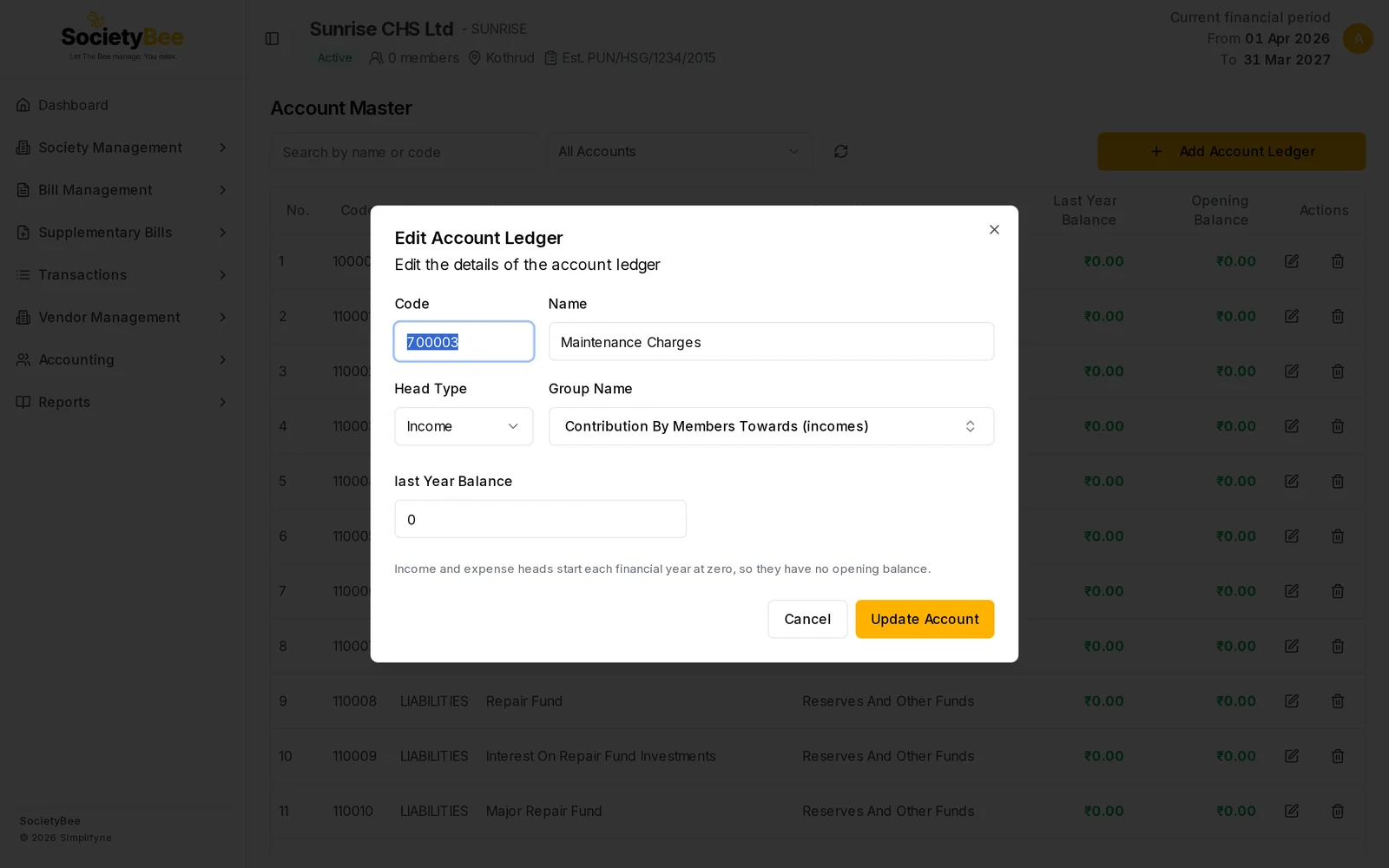
| Kind of account | Opening balance here? | Why |
|---|---|---|
| Income accounts (for example Maintenance Charges) | No | Income and expenses start every financial year at zero. Last year's result moves to the Income & Expenditure account. |
| Expense accounts | No | Same reason. |
| Funds and liabilities (Sinking Fund, Repair Fund, share capital) | Yes | They carry forward each year. |
| Assets other than cash and bank (deposits, investments) | Yes | They carry forward each year. |
| Cash Book | No, use Cash / Bank Books | Its opening comes from the Cash Book's opening balance. |
| Bank accounts | No, use Cash / Bank Books | Its opening comes from the Bank Book's opening balance. |
| Members' Receivable | No, use each member's arrears | Its opening comes from each member's opening arrears. |
| TDS Payable and GST accounts | No | They are worked out from vendor invoices and bills. |
Member arrears
What members owe from before is entered on each member, not here. A member's Previous Balance Details has three amounts:
- Principal Opening Balance: unpaid maintenance and charges. A minus amount is an advance the member has already paid.
- Interest Opening Balance: unpaid interest.
- Interest Free Arrears: an amount that will not be charged interest.
These amounts appear as arrears on the member's first bill. Because old principal is already overdue, the first bill also charges interest on it. Opening interest does not earn more interest. The arrears are recorded once, on the first bill, and are never added again on later bills. See Member opening balance and arrears.
Fields and buttons
| Field or button | What it means | Example |
|---|---|---|
| Opening Balance (Account Master) | Balance brought forward for an asset or liability | 200000 |
| last Year Balance | Last year's closing figure, kept for reference | 0 |
| Update Account | Save the account | |
| Cancel | Close without saving | |
| Opening Balance (Cash / Bank Books) | Cash or bank balance on the opening date | 250000 |
| Principal Opening Balance (member) | Unpaid charges from before | 5000 |
| Interest Opening Balance (member) | Unpaid interest from before | 300 |
| Interest Free Arrears (member) | Arrears excluded from interest | 1000 |
Common mistakes and questions
My balance sheet does not balance. Check that the total of your opening assets (cash, bank, deposits, member dues) equals your opening liabilities and funds, as in your last audited balance sheet. Ask your accountant for the missing amount.
Can I enter opening balance for income? No. Income and expense accounts always start at zero in a new financial year.
Where do I show money members already owe? On each member's Previous Balance Details, not in Account Master.
What happens next
Next, add your members and enter any arrears for each of them.