
Set the interest formula
Choose how many days members get to pay, how late-payment interest is charged, and how payments and rounding work on a bill.
Before you start
What this page does
The Interest Formula step decides when a bill is due and how a society charges interest on dues that are not paid on time. These settings are used every time you generate bills, so set them before your first bill run.
Where to find it
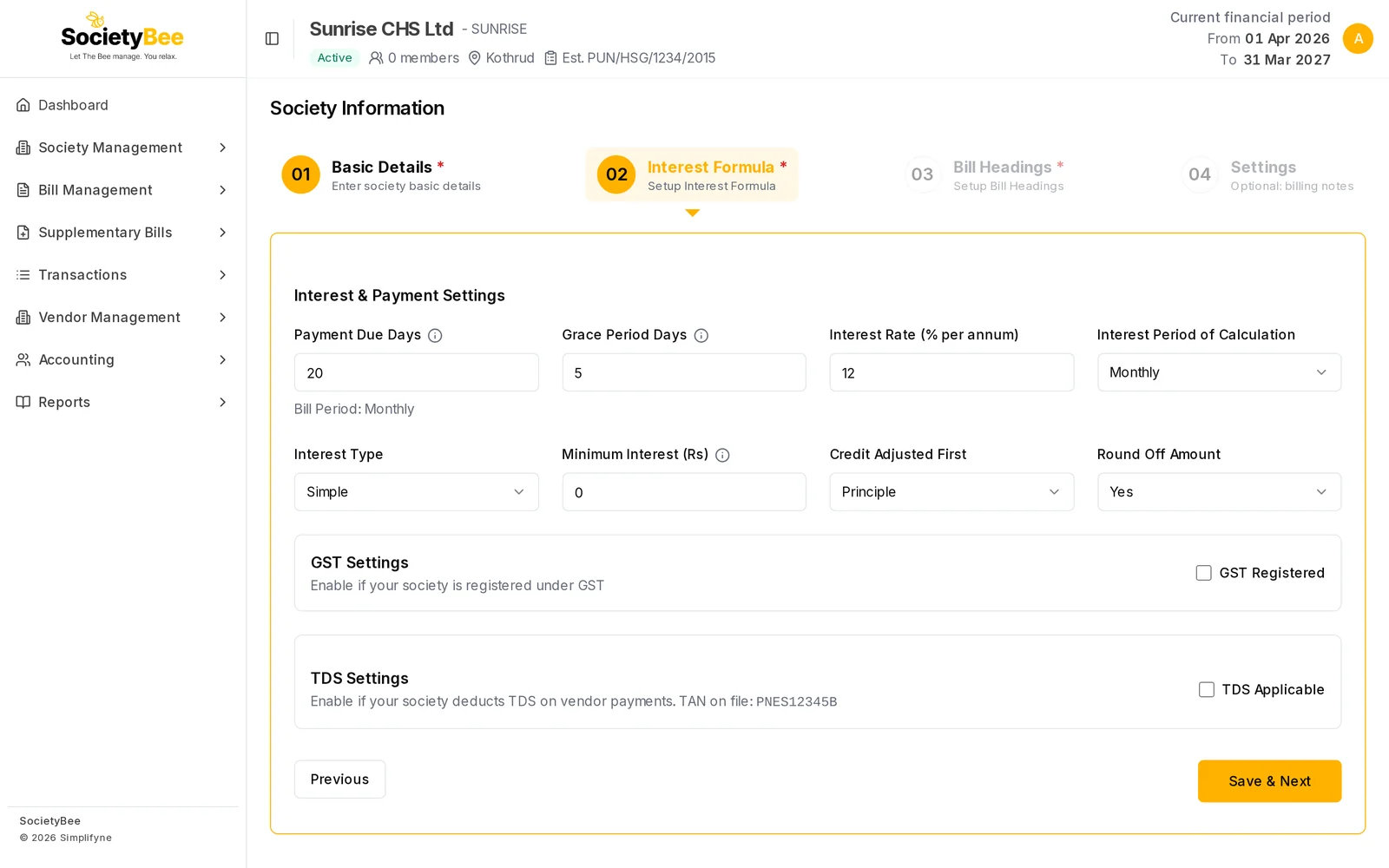
Go to Society Management > Information and open the Interest Formula tab (step 02). You reach it with Save & Next from Basic Details.
Fill in the page
Enter the Payment Due Days
This is the number of days members get to pay after the bill date. Due date = Bill Date + Payment Due Days. If you enter
20and the bill date is 01 Oct 2026, the due date is 21 Oct 2026. The small note under the field shows your bill period, for example Bill Period: Monthly.Enter the Grace Period Days
These are extra days your society allows after the due date. Payment Due Days plus Grace Period Days cannot be more than the bill period (30 days for monthly, 60 for bi-monthly, 90 for quarterly, 180 for half-yearly, 365 for yearly). If it is more, the page shows an error when you save.
Enter the Interest Rate
Type the yearly rate as a percentage. The default is
12(12% per year). Use0if your society does not charge interest. The allowed range is 0 to 100.Choose the Interest Period of Calculation
Pick Daily to charge interest only for the days a payment was actually late, or pick your bill type (for example Monthly) to charge one flat amount per bill period. See the table below.
Check the Interest Type
Only Simple interest is available. Interest is never charged on interest.
Set the Minimum Interest (optional)
If the interest worked out for a member is less than this amount, no interest is charged at all. Leave it at
0to charge every amount.Choose Credit Adjusted First
Decide what a payment clears first when a member pays less than the full amount. See the table below.
Choose Round Off Amount
Pick Yes to round bill amounts to whole rupees, or No to keep paise.
Save
Press Save & Next to continue to Bill Headings. After onboarding is complete you also get a Save button that stays on this page. Previous goes back to Basic Details.
Fields and buttons
| Field or button | What it means | Default | Example |
|---|---|---|---|
| Payment Due Days | Days after the bill date by which payment is due | 25 | 20 |
| Grace Period Days | Extra days after the due date. Due days plus grace days must fit inside the bill period. | 0 | 5 |
| Interest Rate (% per annum) | Yearly interest rate, 0 to 100 | 12 | 12 |
| Interest Period of Calculation | Daily, or one charge per bill period | Monthly (your bill type) | Daily |
| Interest Type | Only Simple | Simple | Simple |
| Minimum Interest (Rs) | Interest below this amount is not charged | 0 | 10 |
| Credit Adjusted First | What a part-payment clears first: Principle or Interest | Principle | Principle |
| Round Off Amount | Round bill amounts to whole rupees | Yes | Yes |
| Previous | Go back to Basic Details | ||
| Save | Save and stay here (appears once onboarding is complete) | ||
| Save & Next | Save and open Bill Headings |
Interest period: daily or per bill period
| Per bill period (for example Monthly) | Daily | |
|---|---|---|
| How it works | One flat charge for the whole period on whatever was unpaid at the due date | Interest for each day the money was late |
| Formula | Unpaid amount x yearly rate / number of periods in a year | Unpaid amount x yearly rate / 365 x late days |
| Paid a few days late | Still charged the full period | Charged only for the late days |
| Easy to explain to members | Very easy | Needs a day-wise note on the bill |
Example (monthly, 12% a year). A member does not pay a bill with Maintenance ₹2,500 and Sinking Fund ₹400, both set to apply interest, and Water ₹300, which does not. Next month's bill carries interest on ₹2,900 only: ₹2,900 x 12% / 12 = ₹29.00. Water is never part of the interest base. If the member had paid in full on or before the due date, the interest would be ₹0.
Credit Adjusted First
| Choice | A part-payment clears this first | Effect |
|---|---|---|
| Principle | Older unpaid charges, then the latest bill, then interest | Interest-bearing principal falls faster, so the next bill's interest is lower |
| Interest | Unpaid interest first, then the charges | Interest is cleared first, so a little more interest is charged next time |
Members who owe no interest see the same result under both choices.
Common mistakes and questions
I get "Sum of payment due date and grace period cannot be greater than 30 for monthly billing". Lower the Payment Due Days or the Grace Period Days so the total is within the limit for your bill type.
Can I stop interest completely?
Yes. Set Interest Rate to 0.
Does a member who pays a day late get charged the full month? With the per bill period choice, yes: interest is decided on what was unpaid at the due date. With Daily, only the late days are charged.
What happens next
Next, set up GST and TDS if they apply to your society (GST and TDS settings), then define the charges that appear on every bill in Bill Headings.