
TDS reports, deposits and the statement
See how much TDS you owe the government, record a challan deposit, review deposit history, cancel a wrong deposit, and download the quarterly TDS statement working paper.
Before you start
What this page does
TDS Reports has three tabs. They show the TDS you have deducted but not yet paid to the government, the deposits you have made, and a statement working paper for your quarterly TDS return.
Where to find it
Go to Vendor Management > TDS Reports.
Outstanding Liability
This tab lists TDS collected from vendor invoices, deposited so far, and outstanding, one row for each kind of payment and financial year. The Total Outstanding amount is at the top right.
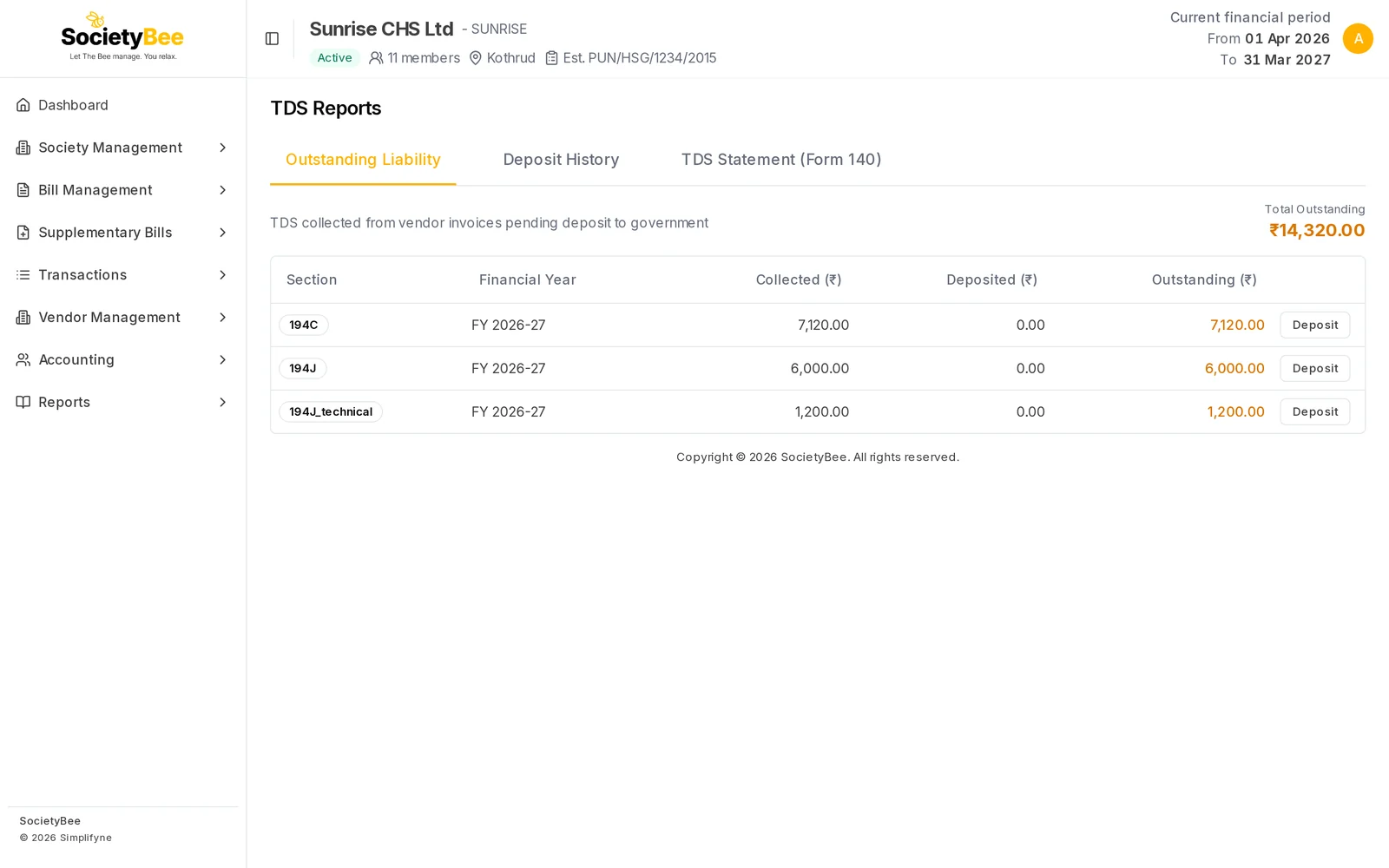
| Column | What it shows |
|---|---|
| Section | A short code for the kind of payment, for example 194C for contractors |
| Financial Year | The year the invoices belong to |
| Collected (₹) | TDS held back from vendors |
| Deposited (₹) | What you have already paid to the government |
| Outstanding (₹) | Collected minus deposited |
The contractor row above adds two invoices: ₹720 for the security firm and ₹6,400 for the gardener without a PAN.
Record a deposit
Press Deposit
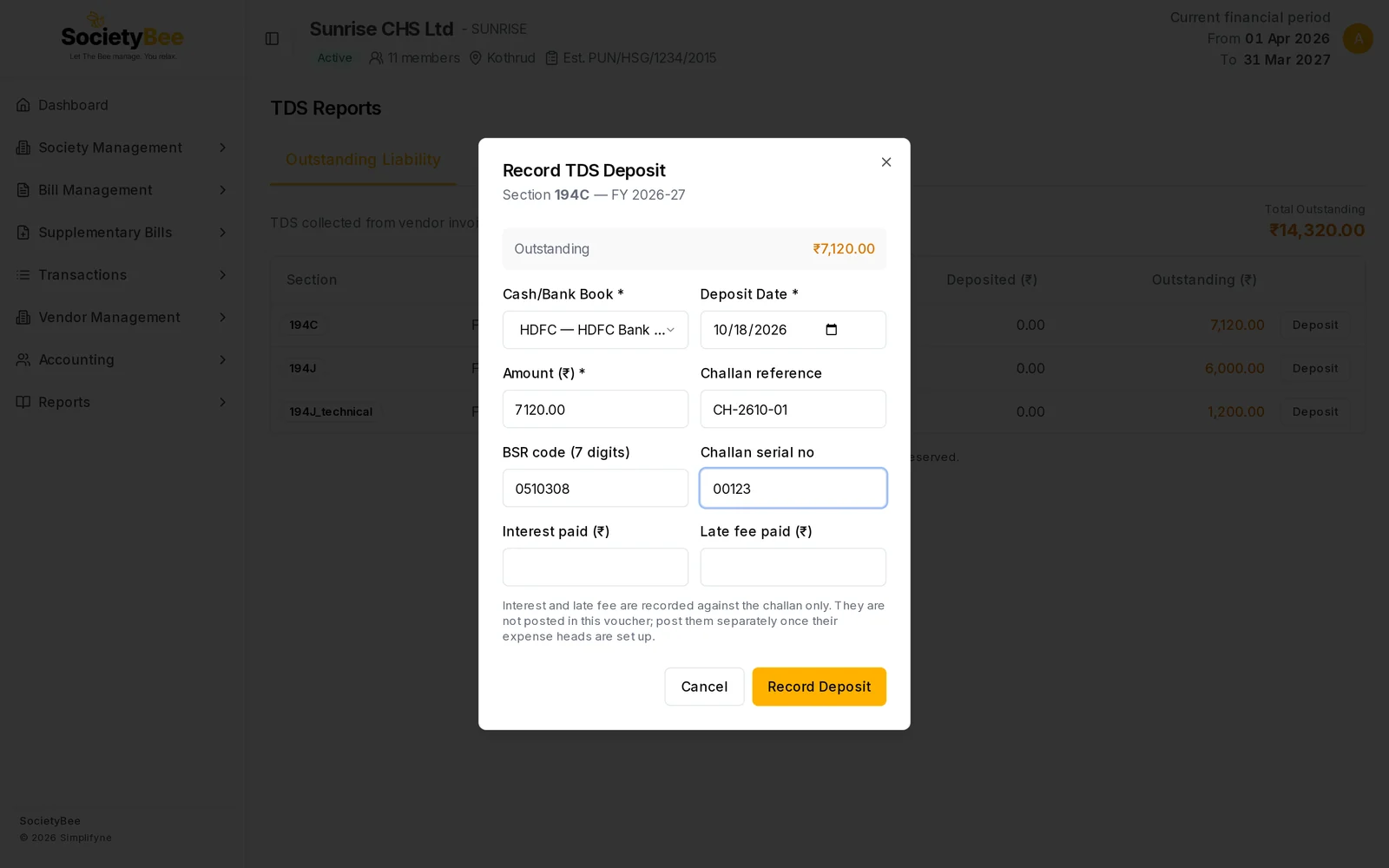
On the row, press Deposit. A box titled Record TDS Deposit shows the section, the financial year and the Outstanding amount.
Choose the Cash/Bank Book
Pick the book the challan was paid from. Only cash and bank books are listed.
Check the Deposit Date and Amount
The date starts as today. Amount starts as the full outstanding amount. Lower it to deposit part of it. You cannot deposit more than is outstanding.
Enter the challan details (optional)
Challan reference is your own reference. BSR code (7 digits) and Challan serial no come from the bank's challan receipt and are needed when the statement is filed.
Add interest and late fee if you paid any
Interest paid (₹) and Late fee paid (₹) are recorded against the challan only. They are not posted in the deposit voucher, so post them separately as an expense.
Press Record Deposit
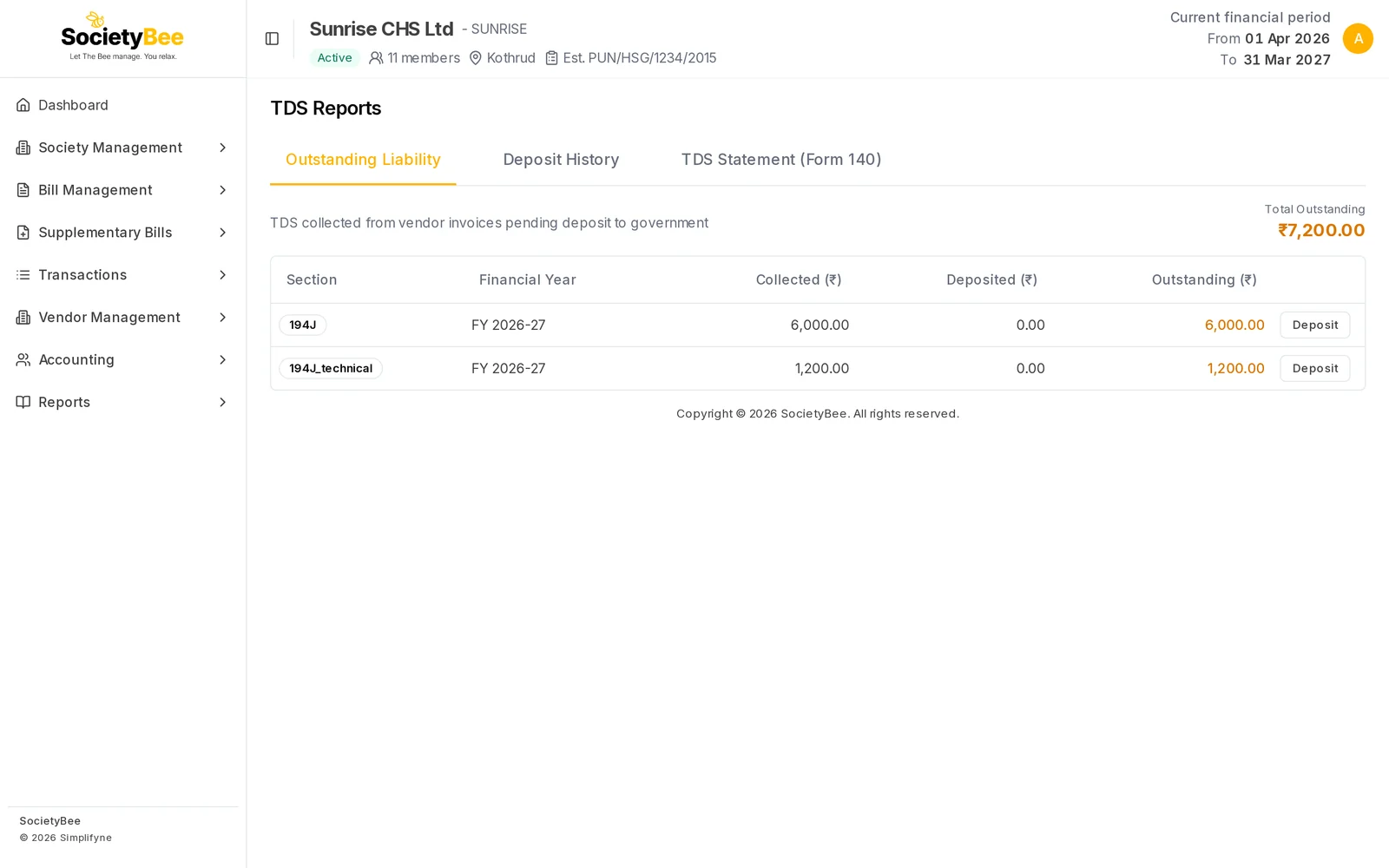
The message TDS deposited — PV-000016 appears, and the outstanding amount drops. A row that is fully deposited leaves the list.
Deposit History
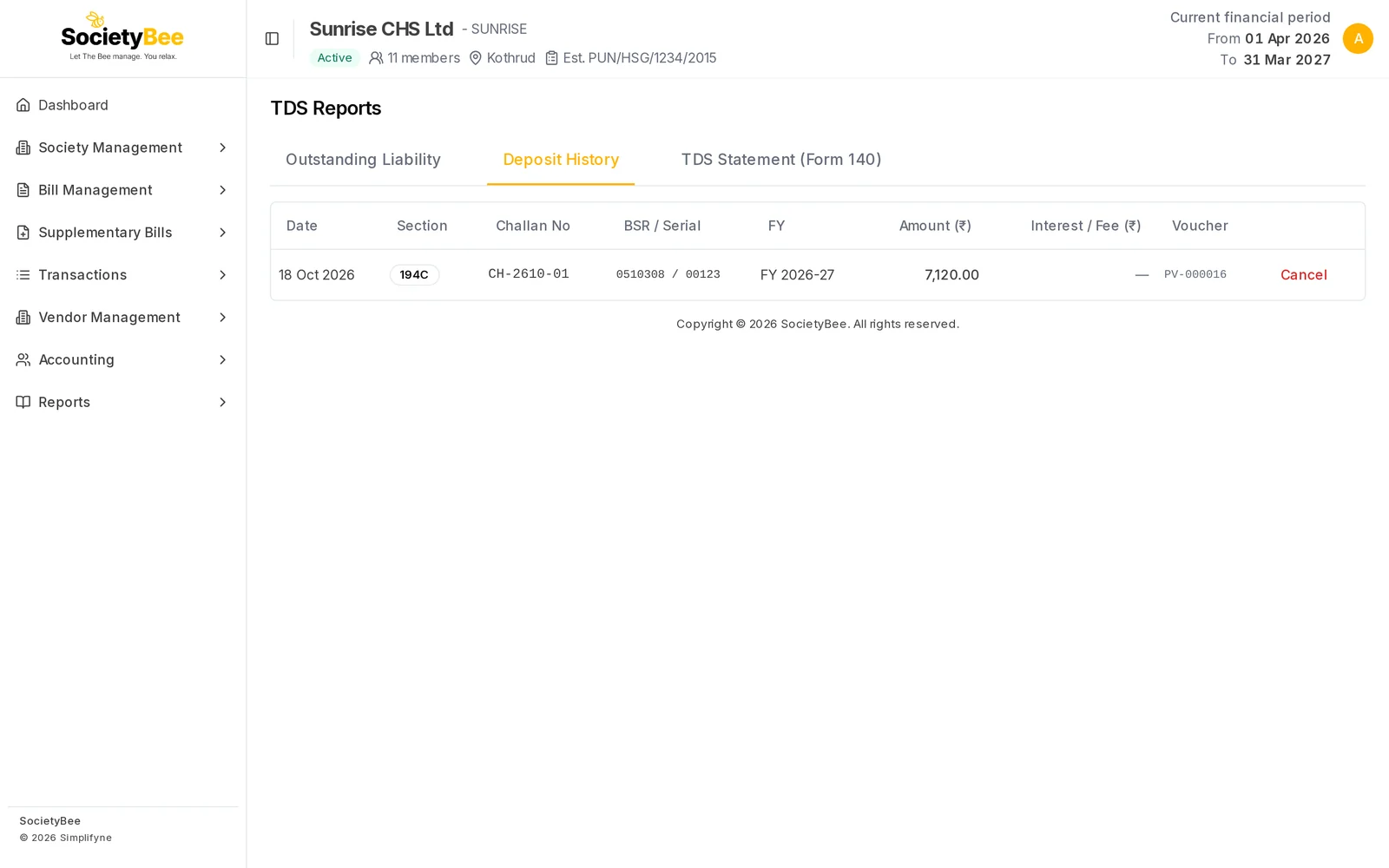
This tab lists every deposit with its Date, Section, Challan No, BSR / Serial, FY, Amount, Interest / Fee and Voucher. The voucher starts with PV- and also appears in the voucher list.
Cancel a deposit (admin)
If a deposit was entered wrongly, an admin presses Cancel. A box titled Cancel TDS deposit explains that the deposit is not deleted: a reversing entry is posted under the same voucher number and your reason is recorded. Type the Reason and press Cancel deposit, or press Keep deposit.
TDS Statement (Form 140)
This tab prepares the figures for your quarterly TDS statement.
Choose the Financial Year
The list holds the last five years, for example FY 2026-27.
Press Load Data
A table lists TDS by Quarter, Nature, Law / table, Vendor Name, PAN, number of Invoices, Taxable base (₹), Rate and TDS (₹), with a total row.
Download the working paper
Press Download working paper (.xlsx) to get the same data as an Excel file.
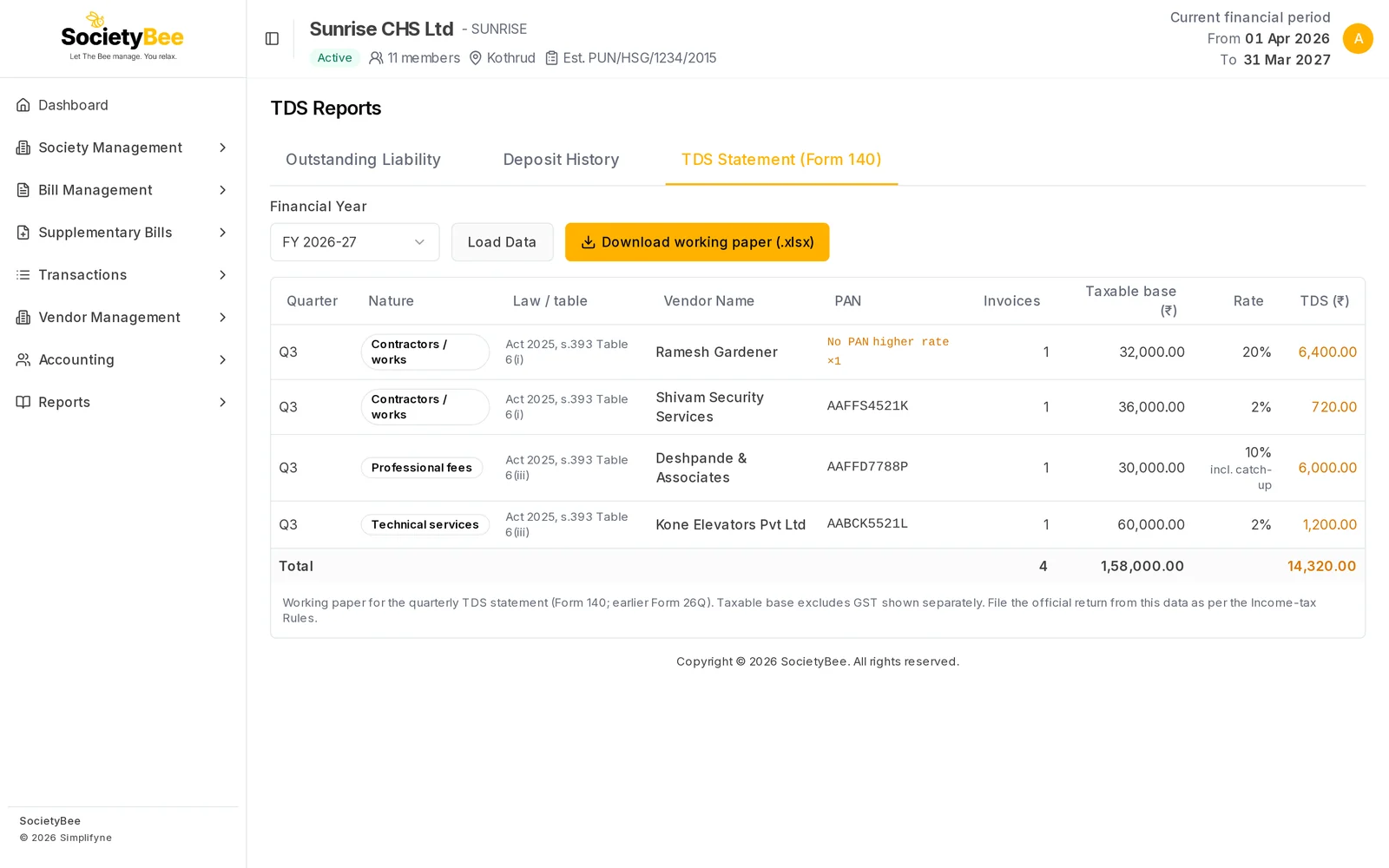
Things to know when you read it:
- A vendor with no PAN is marked No PAN higher rate ×1, where the number is how many invoices used the higher rate.
- A row marked incl. catch-up carries TDS on earlier bills too, so the TDS can be more than the rate times the taxable base shown. See TDS on vendor bills.
- The taxable base leaves out GST that is shown separately.
Fields and buttons
| Control | What it does |
|---|---|
| Deposit | Opens the deposit box for that section and year |
| Cash/Bank Book | The book the deposit is paid from |
| Deposit Date | The day the challan was paid |
| Amount (₹) | The amount deposited, up to the outstanding amount |
| Challan reference | Your own reference for the challan |
| BSR code (7 digits) | Bank branch code from the challan receipt |
| Challan serial no | Serial number from the challan receipt |
| Interest paid (₹), Late fee paid (₹) | Recorded with the challan only |
| Record Deposit | Posts the deposit |
| Cancel (admin) | Reverses a deposit with a reason |
| Load Data | Loads the statement table for the chosen year |
| Download working paper (.xlsx) | Downloads the table as Excel |
Common mistakes and questions
Outstanding shows nothing. No TDS has been deducted yet, or it has all been deposited. The tab says No outstanding TDS — all collected TDS has been deposited.
I deposited the wrong amount. An admin cancels the deposit and records it again.
I cannot cancel a vendor invoice. If its TDS was already deposited, cancel the deposit first. See Invoice details and cancel.
The statement is empty. The table lists only confirmed invoices that had TDS in the chosen year. The page says No confirmed invoices with TDS for the selected financial year.
What happens next
Keep the challan receipts safe. File the quarterly statement with the help of your CA.